
In the post yesterday we asked if the screenshot below was that of Firefox or Chrome.
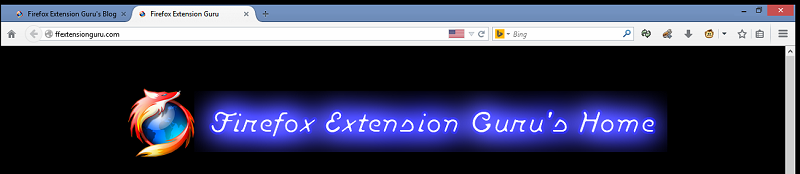
The answer is Firefox. Firefox 29 Beta 1 release with the new Australis theme/UI. This is the first major UI change since Firefox 4 was released on March 22, 2026 (after over a year of developmental releases). Firefox 4 also introduced Tabs on Top, the hidden menu bar and the Firefox button, which with Firefox 29 will be a thing of the past. Kind of a shame too as it at least made Firefox standout from other browsers which are really all starting to look the same now.
Like Thunderbird and Chrome there is now an app/menu button. In Firefox (and Chrome) it is on the far right side of the main toolbar. However, I was rather disappointed with the limited number of options in this menu compared to that of Chrome and for the matter Thunderbird. As you can see below there are a handful of options and they are displayed as icons with small text.

Firefox 29 App Menu
I really don’t understand as to why Mozilla chose to put so little on the new Firefox app menu, especially if you compare below to what options are on the current Firefox 28 Firefox Button menu along with the app menus of Thunderbird 24.4.0 and even Chrome.
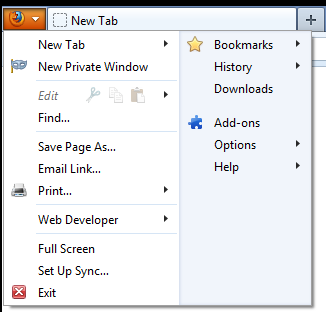
Firefox 28 Firefox Button (App) Menu

Thunderbird 24.4.0 App Menu

Google Chrome App Menu
While you can add options to the new app menu, it is limited to toolbar buttons that are not already on a toolbar. With the lack of options in the new app menu, people are going to want to keep or restore the menu bar. You can re-display the menu bar by right-clicking on the tab bar and selecting Menu Bar. You can also display the menu bar temporarily by pressing the ALT key.
In Chrome as well on my Firefox “Release” profile (Firefox 28) I have my navigation buttons as follows: back-forward; stop/reload; home. So, I was rather irritated when I updated my “Beta” profile to Firefox 29 and discovered the following: the back button is hidden if you can’t go back; the back button (when visible) and the forward buttons are “attached” to the urlbar; the stop/reload button is also “attached” to the urlbar on the right-side; the home button is now on the far left. It wasn’t long before I was accidentally clicking the home button when I thought I was clicking the back button (at least where I was use to the back button being located).
A while back Gareon wrote about the Classic Toolbar Buttons add-on by Aris. I gave this try and while it did let me “detach” the back-forward button from within the address bar, they were still “attached” as in they could not be moved. The same applied for the stop/reload button too. After a little more hunting I found another add-on by Aris, Classic Theme Restorer (Customize Australis). With this add-on you can restore squared tabs, appmenu, add-ons bar, small button view and more on Australis UI. There are lots and lots of customization options with this add-on, so you can setup Firefox pretty much anyway you could possibly think of (which is rater ironic considering this was the big claim to fame for Firefox when it first came out).

Main Options Menu on Classic Theme Restorer
I don’t mind the new tab style, so I went ahead and opted not to restore the square tabs. I did restore the old Firefox App button and made it icon (which is different from that of Firefox 28) only on the titlebar. Movable back-forward button allows you to “detach” the button(s) from the urlbar. The Hide urlbars stop & reload buttons option is somewhat confusing, but it has to do with the way stop & reload buttons are “connected” with the new theme. Checking this option will remove the button(s) from the urlbar. Then, you can right-click on a toolbar button and choose Customize… Grab the stop & reload button(s) and drag to where you want the button(s) on your toolbar. The end result of my customization is below.

So much like Windows 8 (with Classic Shell), Firefox 29 and Australis are bearable once you install an add-on and do a little tweaking. The two add-ons can be used together if you choose (I don’t mind the newer buttons so I opted not to use the buttons one). The Classic Toolbar Buttons can be used with Firefox 24 or newer and installs without a restart. However, Classic Theme Restorer can currently only be used with Firefox 29 Beta or any of the other current developmental builds (Firefox 30 Aurora and Firefox 31 Nightly) and will require a restart when installed. Once Firefox 29 has been released, you will need to update to Firefox 29, then you will be able to install the Classic Theme Restorer add-on, restart then customize your Firefox to your liking.
One more thing…a teaser of sorts…Firefox 29 is supposed to include a “new and improved” version of Firefox Sync. I have never had much luck with this feature before, which is why I have been using Google Chrome on most of my devices. I just need to install Firefox 29 Beta on my laptop and tablet, then I can try out this feature.
Pingback: The New Firefox Sync (Firefox 29) | Firefox Extension Guru's Blog
The frustration I have had with Mozilla is their complete refusal to establish and maintain a distinct and unique appearance versus IE, Chrome, Opera & Safari. Now with Australis, it is the height of ridiculousness that a so-called independent project such as Mozilla Firefox would willingly choose to make itself look like its major competitor, Google Chrome.
Add on top of that that Mozilla would think that those of us who use Firefox on non-touch screens would actually like the waste of screen real estate that is the new hamburger button. The final strike against Australis is the dropping of the addon bar. For a browser whose key selling point is customization, why drop the addon bar completely from it while copying Chrome by forcing buttons normally placed on the addon to have to hide behind another menu button on the nav bar?
I have been able to “restore” Nightly, Aurora and now Beta to the rough appearance I had with the previous default theme by using CTR (with CTB) from Aris-thanks a million for your hard work, Aris-but I have to ask Mozilla why they did not offer Australis as separate addon theme first. Could it be that by not offering Australis as a choice to users, Mozilla avoided being embarrassed when too few, if any, users opted for Australis?
Chrome’s look and feel was based off the initial research done years ago by Mozilla - they just implemented it first before Mozilla finally did. So you’ve got the situation entirely backwards.
How does the hamburger menu take up significantly more space than the firefox button or menubar did?
It’s not offered as just a theme, because they rewrote huge parts of the UI code along with the look/feel changes, making it cleaner, faster code which also gives addon/theme designers *more* capabilities in modifying it, so you’ll see more done with it in the future than currently.
Mozilla is trying to build the windows 8 of the browser world, if I wanted to use Chrome, I would be using it already. If I have to use all kinds of ad-on software I will just go t chrome. Just like I bought a new computer with windows 7 instead of windows 8.
I ended what seems like a decade of using Firefox as my main browser about 18 months ago in favor of Pale Moon x64. The advantages were two-fold: a frozen interface and the fact that it worked with add-ins that newer versions of Firefox broke (mostly permanently). Still, I kept my Firefox current, mostly to deal with issues arising at the office. I had beaten it into their heads that IE was not to be used without court order and I thought most of what Firefox was, continued to be. I started the process of switching all users to Pale Moon on the weekend (cheating by CALLING it Firefox and using a vaguely Firefox-like icon) just to avoid the mass hysteria going against my oft-stated wishes might cause. I will have completed the process before Australis comes out. For me, Firefox ceases to exist come the release of the product after Firefox 28. Sad to see it go, to see it become a second-rate Chrome. Chrome does Chrome better than Mozilla does. Tis true and nothing the silence from the Mozilla doyens does changes that. I’m angry about the extra work, but it’s the sheer pointlessness OTHER than to legitimize some continuing design and programming jobs that bothers me the most. I really wish somebody from on high would publish a rationale for this … I’m out of words.
It depresses me greatly realizing that Firefox has gone off the track of what I like, as Opera did years ago, and that there’s no option I like. Having to use tons of extensions and about:config modifications to make it how you want and deal with it’s constant updating over non-security releated matters which may break extensions is a pain.
This update might be the one that drives me to Chrome or even IE. If you’re going to hate your browser anyway, might as well go with the easiest or most popular.
I’m switching to Chrome. Why bother with a Chrome wannabe?
Out of all the unnecessary tweaks to the UI of the new Firefox 29 I was forced to enable this afternoon, I wish there had been a “Uninstall New Clusterfuck Version” button. I still can’t find my status bar.