
About six months ago I download this extension just to try it out. I had a friend raving about it, so I decided to try it out myself just to see. Now I can’t imagine using Firefox without it. Instead of having the Firefox download manger pop-up in it’s own window or tab this adds a “download statusbar” directly above your status bar.
During the download it will display a colored progress bar, the name of the file, amount download so far, estimated time and download speed. If you hover your mouse over the downloading file the tooltip will show you more details including where you are downloading the file from, the total size and the status including amount and percentage completed as well as transfer rate. Once the download is completed the status bar will change colors and right-clicking on the completed download will give you more options…
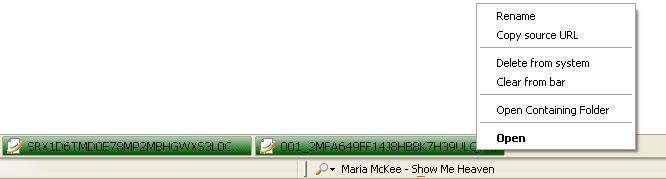
Click For Larger Image
When I am done viewing a file (such as PDF’s) that I don’t need to have sitting on my hard drive, all I have to do is right-click on the file(s) and select ‘Delete From System’. If I were to have used the Firefox’s Download Manager I would need to open the Download Manager, select the file, right-click and then select ‘Open Containing Folder’ which would then open Windows Explorer and then I could delete the file(s).
This extension has a lot of options (accessible via the add-ons manager) including choosing what information to display during the download, how and when downloads should be cleared, colors for downloading (you can even specify color display based on the transfer speed) and completed files as well as the size of each download (tab).
Download Statusbar works with Firefox 1.5.0.X and 2.0.0.X builds and is about 115 KB.