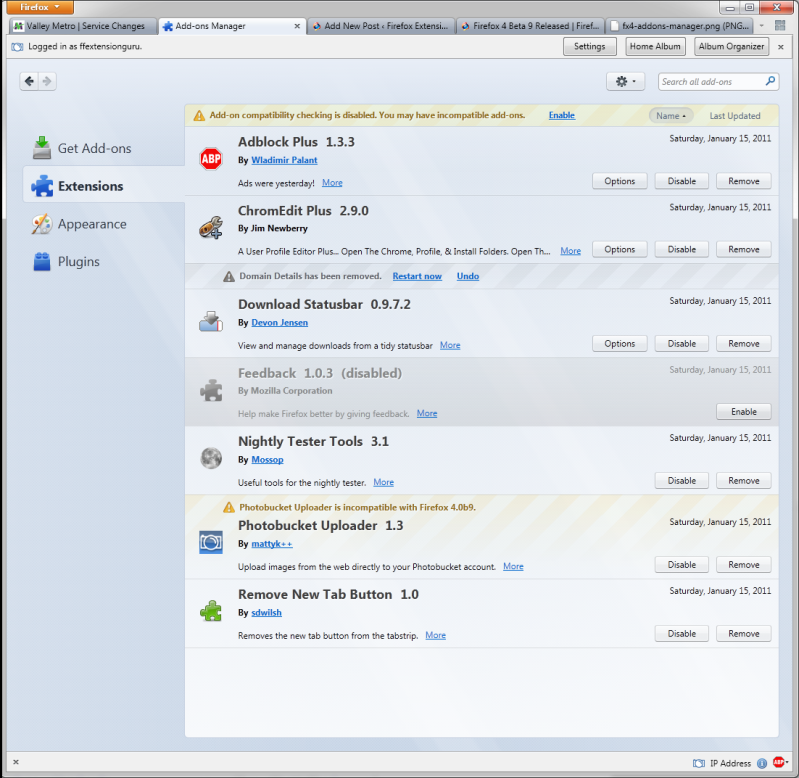
Part of the big changes with Firefox 4 is a newly designed Add-Ons manager and user interface (UI).
Some observations:
- First off, the add-ons manager now opens in a tab instead of separate window.
- The manager itself is wider now as the menu options are down the side instead of along the top. Because of the width, trying to use the Add-Ons Manager in Sidebar tweak is not going to be very useful.
- You must still restart whenever adding/removing or disabling/enabling add-ons.
- Mozilla has finally ‘un-hidden‘ the option to install add-ons via a file (gear button next to the add-ons search box at the upper right corner).
- It a lot easier to tell which add-ons are disabled and/or pending removal with this new UI.
The below screenshot is after I enabled the Nightly Tester Tools extension’s ‘Force Addon Compatibility’ feature, hence the warning at the top of the window.